SkillScoop helps you connect with people looking for your skills – fast, simple, and stress-free.
Set up your profile once, and start getting discovered by clients in your area.
Good news? It only takes a few minutes to get everything ready.
After sign up, you’ll land on your My Account page.
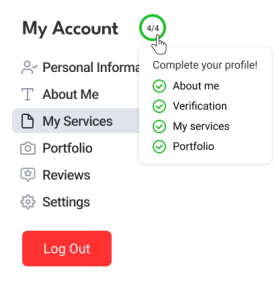
This is where you complete your profile:
- Add your services (so people can find you)
- Verify your account (to unlock more jobs)
- Write your About Me (build trust)
- Upload your portfolio (show your work)
- Add a profile photo (stand out)
- Check your details
Step-by-Step Setup
1. Add Services
Choose all services you offer in My Services.
This is how clients find you – you’ll appear on the Specialists page, where clients can search and reach out to you directly.
👉 Add your services
2. Verify Your Account
Complete account verification and get your “Verified” tick – this helps build trust with clients.
Plus, only verified specialists can quote on hassle-free payment jobs, so you’ll unlock more opportunities.
3. About Me
Write a few sentences about yourself in the About Me section.
This is your chance to:
- Explain what you do
- Share your experience
- Show why someone should choose you
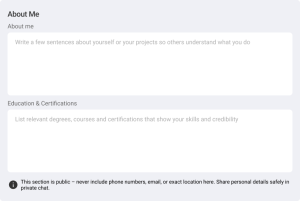
You can also add degrees, courses, and certifications under Education & Certifications to strengthen your profile.
4. Portfolio
If relevant, upload photos of your work:
- Past projects
- Work samples
- Before/after results
- Relevant certifications
A strong portfolio helps clients understand your skills and gives them confidence to choose you.
5. Build Trust
Under Personal Information:
- Add a profile photo (logo or personal) – this helps you stand out
- Add your phone number (only visible to clients you interact with)
- Make sure your location is correct
5. Stay Active
Once your profile is ready, stay active.
- Check new jobs regularly
- Send quotes for jobs that match your skills
- Reply quickly to messages
More activity = more chances to get hired.
🎯 You’re Ready!
Finish your profile and start getting discovered.
Let’s get you booked 🙌